
Learn how to create a LinkedIn company page that boosts your brand visibility, attracts talent, and engages customers. Discover easy, step-by-step guidance to grow your business on LinkedIn.
Did you know that LinkedIn is the top social media platform for B2B marketers? An impressive 80% of leads come directly from this platform. Despite this, many small businesses and entrepreneurs have yet to leverage LinkedIn’s full potential. If you’re ready to amplify your brand’s presence, you should create a LinkedIn company page. This will help you unlock new growth opportunities.
In this blog post, we’ll guide you through creating a professional LinkedIn page. It will showcase your business and attract top talent. You will also connect with your ideal audience.
Creating and maintaining a strong online presence can feel overwhelming, especially for small businesses with limited resources. Here are some common challenges:
- Time Constraints: Juggling multiple responsibilities leaves little room for setting up and managing a LinkedIn page.
- Lack of Expertise: Many business owners are unsure of how to navigate LinkedIn’s tools and features.
- Content Consistency: Building an engaging company page requires consistent, high-quality content.
- Reaching the Right Audience: It’s challenging to connect with potential clients or partners effectively.
Actionable Strategies for Creating a LinkedIn Business Page
1. Start with the Basics
- Log into your LinkedIn account and navigate to the “Work” menu.
- Select “Create a Company Page” and choose the appropriate page type.
- Fill in essential details like your company name, logo, tagline, and industry.
2. Optimize Your Profile
- Write a compelling “About” section that highlights your mission, services, and values.
- Include relevant keywords to improve search visibility.
- Add a cover image that aligns with your brand identity.
3. Share Valuable Content
- Post regularly about industry trends, company updates, and behind-the-scenes content.
- Use a mix of formats such as articles, videos, and infographics to keep your audience engaged.
- Encourage employees to share and interact with your posts to boost reach.
4. Engage with Your Audience
- Respond to comments and messages promptly to build relationships.
- Join and contribute to LinkedIn groups relevant to your niche.
- Use LinkedIn analytics to monitor engagement and refine your strategy.
5. Promote Your Page
- Add your LinkedIn page link to your website, email signature, and other social media profiles.
- Run targeted LinkedIn ads to reach potential customers and partners.
At Khemeia Hub, we specialize in helping small businesses maximize their LinkedIn presence. Our approach includes:
- Step-by-Step Guidance: Simplified processes to create and optimize your company page.
- Expert Insights: Customized strategies tailored to your business needs.
- Creative Content Solutions: Tips for crafting compelling posts and showcasing your brand identity.
For example, a food vendor partnered with us to launch their LinkedIn page. Within three months, they experienced a 40% increase in client inquiries and expanded their professional network significantly.
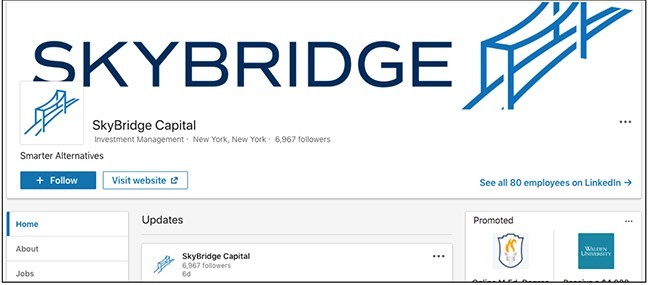
Below is a screenshot of a completed LinkedIn company page for visual reference
Creating a LinkedIn company page is a powerful step toward building your brand’s online presence. By following these simple strategies, you can establish credibility, connect with your target audience, and achieve measurable growth.
Ready to elevate your business on LinkedIn? Contact Khemeia Hub today for personalized LinkedIn optimization solutions. Let’s turn your vision into reality.
Schedule Your Free Consultation Now.
Related Posts:
 KHEMEIA HUB
Leave a comment